Setup in under 1 minute — no card needed

Every Guest
is Your
Photographer.

Capture every angle, share every smile.

Collect every photo and video from your event in one private gallery. No apps, no accounts—just a simple scan.

Guest enjoying the event
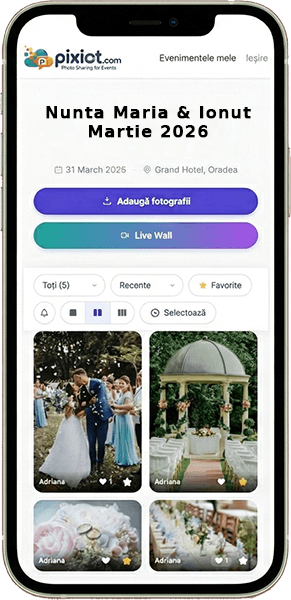
Live photo wall on TV screen Pixiot mobile photo gallery
First event free
No card · Ready in seconds ✨
1min
Setup Time
200+
Free Photos
4K
Photo Quality
0
Apps Required
The Process

Three steps to
effortless memories.

From setup to full gallery—it couldn't be simpler for you or your guests.

01

Create & Print

Generate a unique QR code in seconds. Print it on table cards, signage, or include it in your digital invites.

02

Scan & Snap

Guests scan the code with their camera. No app needed—they enter your gallery instantly and start sharing.

03

Relive the Magic

Watch the gallery bloom in real-time. Play a live slideshow, view up-to-4K photos, and download everything.

Try It Live — No Sign-up

See the Live Wall
in action, right now.

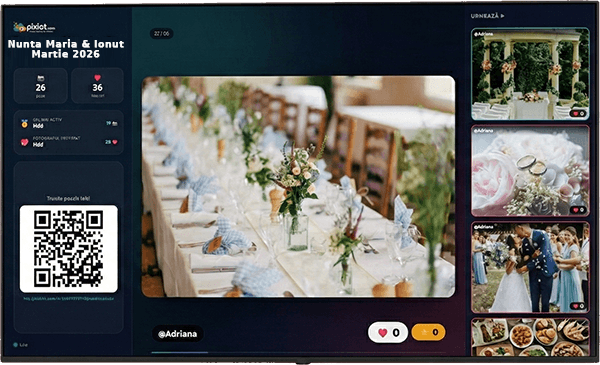
This is a real, running event. Scan the code to add your own photo, vote for the ones you love, and watch every upload and vote land on the Live Wall in real time.

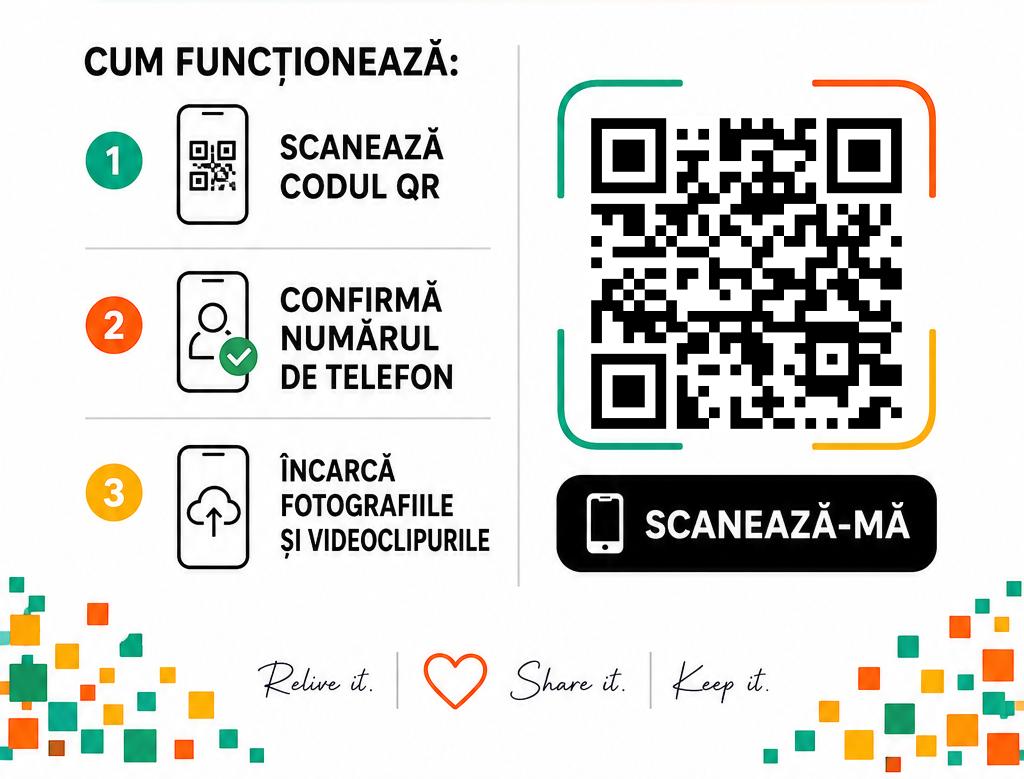
Scan this QR code to join the Pixiot live demo

Scan to jump in

1 Point your phone camera at the code
2 Upload a photo — no app, no account
3 Vote for your favorites & watch them rise
LIVE NOW Pixiot Live Wall showing guest photos and votes updating in real time

Watch it on the big screen

Open the Live Wall on any TV, projector, or laptop and see guest photos and votes appear the instant they happen. Open it on a second screen while you upload from your phone—then watch your photo show up.

Open the Live Wall →
Why Pixiot

Built for how
people actually
take photos.

Modern event photo-sharing that removes every possible barrier between your guests and your gallery.

🚀

Zero Friction

Runs entirely in the mobile browser. Open, scan, upload—no accounts, no downloads, ever.

📸

Up to 4K Quality

Photos are preserved at up to 4K resolution. Sharp, vivid memories—without WhatsApp compression.

📽️

Live Photo Walls

Stream uploads to a live slideshow on any screen the moment guests share them.

🔒

Private & Secure

Galleries shared only with the people you choose. You own every photo and video.

Built For

Every occasion,
beautifully covered.

Weddings
💍

Capture moments your photographer missed.

From the dance floor chaos to the table-side laughs—your guests see things no professional could. Every angle, every tear, every laugh.

Parties & Birthdays
🎉

Every perspective, one gallery.

Stop chasing friends for photos the next morning. Get everyone's shots before the night is over.

Expos & Brand Activations
🏟️

UGC, effortlessly.

Boost engagement and collect user-generated content at trade shows. Perfect for brand awareness and lead generation.

Corporate Events

Professional photo-sharing
for professional events.

💼

Team offsites, conferences, product launches—capture authentic moments across your entire team without relying on a single photographer.

Pricing

Start free,
scale when ready.

No credit card required. Create your first event in under a minute.

Free
$0
per event · no card needed
  • 1 event gallery
  • Up to 200 photos
  • Up to 2-day event
  • QR code generation
  • 7-day gallery access
Get Started Free
Enterprise
Custom
multiple events · annual billing
  • Unlimited events throughout the year
  • Custom branding & white-label
  • Analytics dashboard
  • Priority support
  • Dedicated account manager
Contact Us
FAQ

Common questions,
honest answers.

Do guests need to create an account?
+
No. Guests scan the QR code, open the gallery in their browser, and upload. No sign-up, no password, no app download required.
What happens to photos after the event?
+
Photos stay in your gallery for the duration of your plan—7 days on Free, 1 year on Event plans. You can download everything at any time.
Does it work without Wi-Fi?
+
Uploads require a data connection. We recommend placing your Wi-Fi password information next to QR codes at your event.
Can I moderate what gets uploaded?
+
Yes—on Event and Enterprise plans you can enable moderation mode, holding uploads for your approval before they appear in the gallery.
How does the live slideshow work?
+
Open the slideshow URL on any screen—TV, projector, monitor. Photos appear automatically with beautiful transitions as guests upload them.
What quality are the uploaded photos?
+
Photos are stored at up to 4K resolution. Videos up to 2GB per file. No WhatsApp-style compression—your memories stay sharp.
Ready to Start

Ready to see your event through 100 different lenses?

It takes under a minute to set up. No credit card required.

Launch My Gallery → See How It Works